CSCI 136 - Spring 2026
Data Structures
Home | Lectures | Labs | Handouts | CS@Williams
Lab 10: Word Ladder
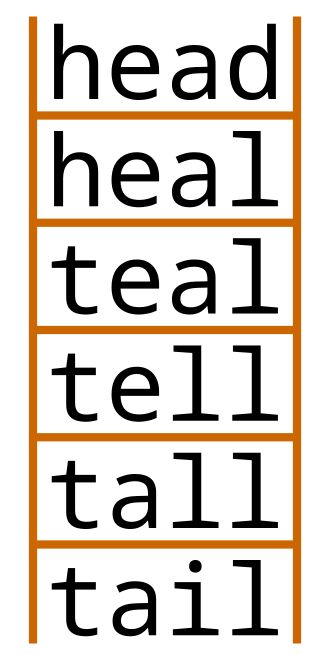
This week we will be writing a program for the word ladder game. In the word ladder game, you are given a start word and an end word. Beginning with the start word, you want to change one letter at a time—ensuring that each intermediate step results in a valid word—to get to the end word. Above, there is a word ladder from head to tail. The goal is for the number of such changes to be as small as possible.
Task 0: Starter Code
The starter code has the following files.
Vertex.java contains the code to hold a single vertex. Each vertex has a name (of generic type E), a list of neighbors, and a boolean to hold if it has been visited or not (for BFS). You do not need to modify this file.Graph.java contains the code to hold a graph, where each vertex in the graph has a name which is of type E. The only instance variable is a hash table that maps the name of a vertex to the vertex object itself—that is to say, the key is a name of type E, and the value is a vertex object of type Vertex. When we do the word ladder, we'll have each name be a String. You do need to modify this file.BFSGraph.java contains the code to run Breadth-First Search (BFS). This code extends Graph.java—so a BFSGraph is a graph that you can run BFS on. This file has four methods: a constructor, a simple method to ensure that all vertices are unvisited, a method to calculate the shortest path using BFS, and a method to print the shortest path after BFS has been run.WordLadder.java contains the code to solve the word ladder problem. You do not need to alter this file. It first reads in words from a file. Then, it creates a vertex for each word. It efficiently finds the "neighbors" of each word, each of which becomes an edge in the graph. Then, after the graph is constructed, the user is repeatedly queried for a pair of words; the shortest word ladder is found using BFS.
Task 1: Filling in Graph class
First, fill in the addVertex() method in Graph.java. If there is no vertex with the name newName in the graph, then a new vertex should be added with name newName; you should put a map from the name to the Vertex object in verticesMap. If there is already a vertex with name newName in the graph, the method should do nothing.
Then, fill in the addEdge(E v1, E v2) method in Graph.java. Two points to be careful of:
v1 and v2 are of type E—they are names of vertices. You'll need to use verticesMap to find the Vertex objects you want to add them to.v1 is a neighbor of v2, and v2 is a neighbor of v1.
Use the main() method in Graph.java to test your code. The method creates a graph with several vertices and edges; then uses printVertices to print all vertices, and printNeighbors to check the neighbors of each vertex. Does the output of this method match your expectations?
Task 2: Implement BFS For Reachability
Implement BFS in the method shortestPath in BFSGraph.java (the first two lines have been given to you in the starter code). You should use the pseudocode given in class as a reference.
For now, we will not return the path itself: we will only return if end is reachable from start.
Therefore, if you ever add a vertex with name end to the Queue, you should immediately return 1 (since you found a path). If the queue is empty, that means there is no path, and you should return -1.
Testing Your Code
After Task 2 is complete, you should be able to determine if there exists a path between two words (you will not see what it is). To start, we'll use simpleWords.txt; you should open the file and design some simple tests to check the functionality of your program.
Run java WordLadder simpleWords.txt. The program will ask you for two words separated by a space; capitalization is ignored. It will call your shortestPath method to try to find the shortest path between them. If you just hit enter (you do not input any string) then the program exits; as always you can also use Control-C to exit.
If you ask for the path between PORT and CART then nothing will be printed yet (there is a path, but path printing is not implemented until Task 3—no news is good news). If you ask for the path between PORT and TINT, it will say that the path does not exist.
(You can also run the examples given below using words.txt).
Task 3: Find the Path
In this task, we will keep track of additional information which allows us to find the path from start to end. This task only involves two lines of code.
In BFS, you repeatedly pop a node off the queue, and add its unvisited neighbors to the queue. Each time one of these unvisited neighbors is added, you should add a new key-value pair to the previous hashmap. It should map the neighbor being added to the queue (as a key), to the vertex that was just removed from the queue (as the value).
Then, change your shortestPath implementation to call printPath() when the end vertex is found (and return the value PrintPath() returns), rather than returning 1.
After this, the printPath method should output the shortest word ladder between the two words when the end vertex is first found. You do not need to change this method.
Testing Your Code
First, do some small tests by running java WordLadder simpleWords.txt. As before, you'll want to read the words in the file first to design some tests.
Then, try some larger instances by running java WordLadder words.txt. The words.txt file contains a very large number of words (including a large number of proper names and some quite obscure words). Let's look at some classic word ladder examples that you can use to test your code. Note that the answer is correct so long as you find a path—there are multiple solutions for many if not most word pairs.
To start, you can use the ladder from head to tail in the image at the top of this document.
The word ladder between cold and warm is 5 words:
coldcordcardwardwarm
The word ladder between white and house is 11 words:
whitewaitewastepastepasseparsepursenursenorsehorsehouse
There is no path between zebra and house.
There is no path between fruit and plans.
Extra Credit
For extra credit, please answer the following question. You'll need to write some extra code to do so. Include the code you used to answer these questions as a part of your submission (you may need to comment it out to ensure that the code still does the rest of the lab properly).
words.txt, and store them in a file called aloof.txt. You may want to look at the HashMap documentation for helpful methods for this task.Submit
Submit your code to Gradescope (Lab 10) and ensure it passes all autograder tests (these are similar to the tests in the main methods). You should upload Graph.java and BFSGraph.java. The autograder should give fairly useful output for any failed tests. Please let me know if there are any autograder issues.
Then, add, commit, and push your code files using git. Enter each of the following commands into your terminal.
git add Graph.java BFSGraph.java
git commit -m "finished with the last lab"
git push
After you commit, log into evolene.cs.williams.edu. Click on your repo, then Lab10, then each code file, and make sure that you can see the modifications you made. If you can see the changes, you're all set! Congrats on finishing all labs in the course!